API reference
API Reference
Upload, manage, search, and analyze video programmatically.
https://api.skiv.com
Key: YOUR_KEY
POST -> id -> GET /{id}
Implement first
Foundations
Authentication, error handling, and the request lifecycle.
Asset operations
Store and retrieve
Upload videos, organize collections, and search your library.
Errors
Skiv returns standard HTTP status codes. The response body may include a JSON status field with more detail.
Status codes
200 OKEverything went as expected.
400 Bad requestThe request was not acceptable, often due to a missing parameter.
401 UnauthorizedNo valid API key provided.
402 Payment requiredNot enough credits.
404 Not foundThe requested resource does not exist.
405 Method not allowedThe target resource doesn't support the method used.
429 Too many requestsThreshold limit has been reached.
500 Server errorSomething went wrong on our end.
Example error
{
  "error": "file_not_provided"
}
API Flow
Long-running endpoints return a Job ID. Poll that ID to check state; once status: done, results are available for 1 hour.
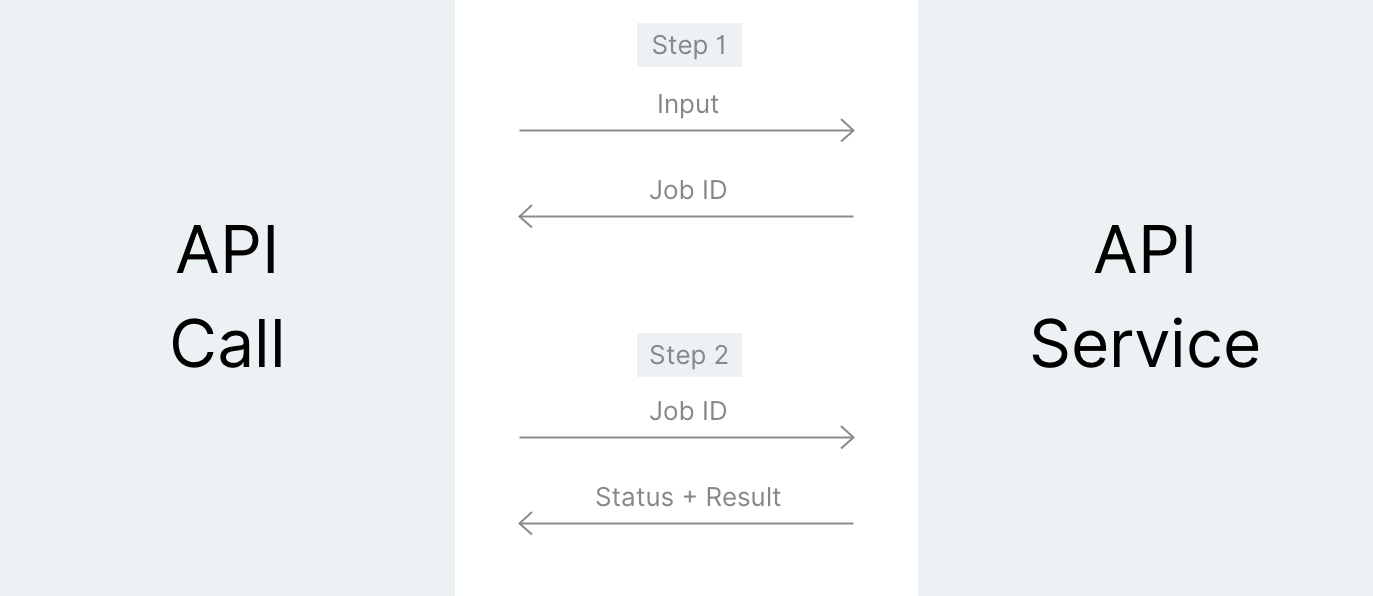
1. Making an API Call
Request example
curl -X POST \
    -H "Key: YOUR_KEY" \
    -F "file=@input.wav" \
    https://api.skiv.com/speech
import requests
headers = {
'Key': 'YOUR_KEY',
}
files = {
'file': open('input.wav', 'rb'),
}
response = requests.post('https://api.skiv.com/speech', headers=headers, files=files)const axios = require('axios');
const FormData = require('form-data');
const fs = require('fs');
const form = new FormData();
form.append('file', fs.readFileSync('input.wav'), 'input.wav');
const response = await axios.post(
'https://api.skiv.com/speech',
form,
{
headers: {
...form.getHeaders(),
'Key': 'YOUR_KEY'
}
}
);Response example
{
  "id": "72787541f3fc8170207ea446a22f60ce4130d950cbebcc058dd53bd321419beb"
}
2. Fetching results
Request example
curl -H "Key: YOUR_KEY" \
    https://api.skiv.com/speech/72787541f3fc8170207ea446a22f60ce4130d950cbebcc058dd53bd321419beb
import requests
headers = {
'Key': 'YOUR_KEY',
}
response = requests.get('https://api.skiv.com/speech/72787541f3fc8170207ea446a22f60ce4130d950cbebcc058dd53bd321419beb', headers=headers)const axios = require('axios');
const response = await axios.get('https://api.skiv.com/speech/72787541f3fc8170207ea446a22f60ce4130d950cbebcc058dd53bd321419beb', {
headers: {
'Key': 'YOUR_KEY'
}
});Response example (pending)
{
  "status": "pending"
}
Response example (done)
{
    "status": "done",
    "transcript": "we choose to go to the moon in this decade"
}Authentication
All API requests require an authentication key. Get one from Settings in the Skiv app, or via the auth endpoint below.
Using a key
Pass the key in the Key header on every request.
Creating a key
Use one of the following requests:
Using a password
Request example
curl -X POST \
     -H "Content-Type: application/json" \
     -d '{"email":"your-email@example.com","passwd":"your-password"}' \
     https://skiv.com/api/auth/login
import requests
headers = {
# Already added when you pass json=
# 'Content-Type': 'application/json',
}
json_data = {
'email': 'your-email@example.com',
'passwd': 'your-password',
}
response = requests.post('https://skiv.com/api/auth/login', headers=headers, json=json_data)const axios = require('axios');
const response = await axios.post(
'https://skiv.com/api/auth/login',
{
'email': 'your-email@example.com',
'passwd': 'your-password'
},
{
headers: {
'Content-Type': 'application/json'
}
}
);email string *Email you used to sign up for Skiv.
passwd string *Your Skiv password.
* required
Response example
{
    "key": "2tHIVrn7GIghYCzVCvpgtf295d1e32d5"
}key stringAuthentication key.
Using a key
Request example
curl -X POST \
     -H "Key: YOUR_KEY" \
     https://skiv.com/api/auth/keys
import requests
headers = {
'Content-Type': 'application/json',
'Key': 'YOUR_KEY',
}
response = requests.post('https://skiv.com/api/auth/keys', headers=headers)const axios = require('axios');
const response = await axios.post(
'https://skiv.com/api/auth/keys',
'',
{
headers: {
'Content-Type': 'application/json',
'Key': 'YOUR_KEY'
}
}
);Response example
{
    "key": "2tHIVrn7GIghYCzVCvpgtf295d1e32d5"
}key stringAuthentication key.
Videos
Store and retrieve videos.
POST Upload
Request example
curl -X POST \
      -H "Key: YOUR_KEY" \
      -F "file=@The_Solar_System.mp4" \
      https://skiv.com/api/files/upload
import requests
headers = {
'Key': 'YOUR_KEY',
}
files = {
'file': open('The_Solar_System.mp4', 'rb'),
}
response = requests.post('https://skiv.com/api/files/upload', headers=headers, files=files)const axios = require('axios');
const FormData = require('form-data');
const fs = require('fs');
const form = new FormData();
form.append('file', fs.readFileSync('hello_world.mp4'), 'hello_world.mp4');
const response = await axios.post(
'https://skiv.com/api/files/upload',
form,
{
headers: {
...form.getHeaders(),
'Key': 'YOUR_KEY'
}
}
);file file *Video to store.
* required
collection stringID of a collection to add the video to after uploading.
visibility stringVisibility of this video. One of "private", "hidden", "password", "unlisted", or "public" (default: private).
Info
Supported video formatsAVI, MOV, MP4, OGG, WMV, WEBM, MKV, 3GP, M4V, MPEG
Response example
{
    "fid": "b47a65b9351e38e6eb86780b09f3e9f9b8e9d795f1af5111f2f34a7f31f9e157",
    "svid": "8KsbyKv",
    "filename": "The_Solar_System.mp4",
    "title": "The Solar System",
    "description": "",
    "url": "https://cdn.skiv.com/w/b47a65b9351e38e6eb86780b09f3e9f9b8e9d795f1af5111f2f34a7f31f9e157/data",
    "duration": 426.84,
    "width": 1280,
    "height": 720,
    "size":251126000,
    "tcreated": 1559655942,
    "visibility": "public",
    "media": "video",
    "ingesting": false
}fid stringFile ID.
svid stringVideo ID.
filename stringOriginal filename.
title stringVideo title.
description stringVideo description.
url stringData URL.
duration floatVideo duration in seconds.
width intWidth of the video in pixels.
height intHeight of the video in pixels.
size intFile size in bytes.
tcreated intVideo uploaded timestamp (Unix time).
visibility stringVisibility of this video. One of "private", "hidden", "password", "unlisted", or "public".
media stringMedia type. Either "video" or "audio".
ingesting booleanTrue if video is still being analyzed.
POST Cut a clip
Request example
curl -X POST \
      -H "Key: YOUR_KEY" \
      -F "svid=8KsbyKv" \
      -F "start=10" \
      -F "end=25" \
      https://skiv.com/api/files/cut
import requests
headers = {
'Key': 'YOUR_KEY',
}
data = {
'svid': '8KsbyKv',
'start': 10,
'end': 25,
}
response = requests.post('https://skiv.com/api/files/cut', headers=headers, data=data)const axios = require('axios');
const FormData = require('form-data');
const form = new FormData();
form.append('svid', '8KsbyKv');
form.append('start', '10');
form.append('end', '25');
const response = await axios.post(
'https://skiv.com/api/files/cut',
form,
{
headers: {
...form.getHeaders(),
'Key': 'YOUR_KEY'
}
}
);svid string *Video ID of the source video to cut the clip from.
start float *Start time of the clip.
end float *End time of the clip.
title stringVideo title (default: source video's title).
description stringVideo description (default: empty).
visibility stringVisibility of the resulting video. One of "private", "hidden", "password", "unlisted", or "public" (default: source video's visibility).
* required
Response example
{
    "svid": "QB7jXla",
    "filename": "The_Solar_System.mp4",
    "title": "The Solar System",
    "description": "",
    "duration": 15.0,
    "width": 1280,
    "height": 720,
    "size": 538526,
    "tcreated": 1559656221,
    "visibility": "public",
    "ingesting": true,
    "cut_svid", "8KsbyKv",
    "cut_start", 10.0,
    "cut_end": 25.0
}Response is the same as for the /upload endpoint. However, it won't include fid and url, because they're not available until ingestion is finished. Additionally includes, cut_svid, cut_start, and cut_end.
POST Update a video
Request example
curl -X POST \
    -H "Key: YOUR_KEY" \
    -H "Content-Type: application/json" \
    -d '{"title":"New Video Name","visibility":"public"}' \
    https://skiv.com/api/files/set/b47a65b9351e38e6eb86780b09f3e9f9b8e9d795f1af5111f2f34a7f31f9e157
import requests
headers = {
'Key': 'YOUR_KEY',
# Already added when you pass json=
# 'Content-Type': 'application/json',
}
json_data = {
'title': 'New Video Name',
'visibility': 'public',
}
response = requests.post('https://skiv.com/api/files/set/b47a65b9351e38e6eb86780b09f3e9f9b8e9d795f1af5111f2f34a7f31f9e157', headers=headers, json=json_data)const axios = require('axios');
const response = await axios.post(
'https://skiv.com/api/files/set/b47a65b9351e38e6eb86780b09f3e9f9b8e9d795f1af5111f2f34a7f31f9e157',
{
'title': 'New Video Name',
'visibility': 'public'
},
{
headers: {
'Key': 'YOUR_KEY',
'Content-Type': 'application/json'
}
}
);title stringVideo title.
description stringVideo description.
visibility stringVideo visibility. One of "private", "hidden", "password", "unlisted", or "public".
domains listA list of domains (strings) video embedding is limited to.
DELETE Delete a video
Request example
curl -X DELETE \
    -H "Key: YOUR_KEY" \
    https://skiv.com/api/files/delete/b47a65b9351e38e6eb86780b09f3e9f9b8e9d795f1af5111f2f34a7f31f9e157
import requests
headers = {
'Key': 'YOUR_KEY',
}
response = requests.delete('https://skiv.com/api/files/delete/b47a65b9351e38e6eb86780b09f3e9f9b8e9d795f1af5111f2f34a7f31f9e157', headers=headers)const axios = require('axios');
const response = await axios.delete('https://skiv.com/api/files/delete/b47a65b9351e38e6eb86780b09f3e9f9b8e9d795f1af5111f2f34a7f31f9e157', {
headers: {
'Key': 'YOUR_KEY'
}
});GET List videos
Request example
curl -H "Key: YOUR_KEY" \
    https://skiv.com/api/files/videos
import requests
headers = {
'Key': 'YOUR_KEY',
}
response = requests.get('https://skiv.com/api/files/videos', headers=headers)const axios = require('axios');
const response = await axios.get('https://skiv.com/api/files/videos', {
headers: {
'Key': 'YOUR_KEY'
}
});Response example
[
    {
        "fid": "b47a65b9351e38e6eb86780b09f3e9f9b8e9d795f1af5111f2f34a7f31f9e157",
        "svid": "8KsbyKv",
        "filename": "The_Solar_System.mp4",
        "title": "The Solar System",
        "description": "",
        "url": "https://cdn.skiv.com/w/b47a65b9351e38e6eb86780b09f3e9f9b8e9d795f1af5111f2f34a7f31f9e157/data",
        "duration": 426.84,
        "width": 1280,
        "height": 720,
        "size":251126000,
        "tcreated": 1559655942,
        "visibility": "public",
        "media": "video",
        "ingesting": false,
        "mature": false,
        "own": true,
        "views": 9716,
        "twatched": 3824799,
    }
]fid stringFile ID.
svid stringVideo ID.
filename stringOriginal filename.
title stringVideo title.
description stringVideo description.
url stringData URL.
duration floatVideo duration in seconds.
width intWidth of the video in pixels.
height intHeight of the video in pixels.
size intFile size in bytes.
tcreated intVideo uploaded timestamp (Unix time).
visibility stringVideo visibility. One of "private", "hidden", "password", "unlisted", or "public".
media stringMedia type. Either "video" or "audio".
ingesting booleanTrue if video is still being analyzed.
mature booleanTrue if video is flagged for mature content.
own booleanTrue if video belongs to the owner of the key used.
views intView count.
twatched intTime watched in seconds.
GET Get a video
Request example
curl -H "Key: YOUR_KEY" \
    https://skiv.com/api/files/videos/8KsbyKv
import requests
headers = {
'Key': 'YOUR_KEY',
}
response = requests.get('https://skiv.com/api/files/videos/8KsbyKv', headers=headers)const axios = require('axios');
const response = await axios.get('https://skiv.com/api/files/videos/8KsbyKv', {
headers: {
'Key': 'YOUR_KEY'
}
});Response example
{
    "fid": "b47a65b9351e38e6eb86780b09f3e9f9b8e9d795f1af5111f2f34a7f31f9e157",
    "svid": "8KsbyKv",
    "filename": "The_Solar_System.mp4",
    "title": "The Solar System",
    "description": "",
    "url": "https://cdn.skiv.com/w/b47a65b9351e38e6eb86780b09f3e9f9b8e9d795f1af5111f2f34a7f31f9e157/data",
    "duration": 426.84,
    "width": 1280,
    "height": 720,
    "size":251126000,
    "tcreated": 1559655942,
    "visibility": "public",
    "media": "video",
    "ingesting": false,
    "mature": false,
    "own": true,
    "views": 9716,
    "twatched": 3824799,
}POST Update video cover / thumbnail
Using a timed frame from the video.
Request example
curl -X POST \
      -H "Key: YOUR_KEY" \
      https://skiv.com/api/files/set/b47a65b9351e38e6eb86780b09f3e9f9b8e9d795f1af5111f2f34a7f31f9e157/cover?t=time
import requests
headers = {
'Key': 'YOUR_KEY',
}
params = {
't': 'time',
}
response = requests.post('https://skiv.com/api/files/set/b47a65b9351e38e6eb86780b09f3e9f9b8e9d795f1af5111f2f34a7f31f9e157/cover', params=params, headers=headers)const axios = require('axios');
const response = await axios.post(
'https://skiv.com/api/files/set/b47a65b9351e38e6eb86780b09f3e9f9b8e9d795f1af5111f2f34a7f31f9e157/cover',
'',
{
params: {
't': 'time'
},
headers: {
'Key': 'YOUR_KEY'
}
}
);time float *Time of the video frame to set as thumbnail.
* required
Info
Supported formatsInt, Float
Response example
{
    "status": "success"
}
Uploading an image to set as the video thumbnail/cover.
Request example
curl -X POST \
      -H "Key: YOUR_KEY" \
      -F "file=@thumbnail.jpg" \
      https://skiv.com/api/files/set/b47a65b9351e38e6eb86780b09f3e9f9b8e9d795f1af5111f2f34a7f31f9e157/cover
import requests
headers = {
'Key': 'YOUR_KEY',
}
files = {
'file': open('thumbnail.jpg', 'rb'),
}
response = requests.post('https://skiv.com/api/files/set/b47a65b9351e38e6eb86780b09f3e9f9b8e9d795f1af5111f2f34a7f31f9e157/cover', headers=headers, files=files)const axios = require('axios');
const FormData = require('form-data');
const fs = require('fs');
const form = new FormData();
form.append('file', fs.readFileSync('thumbnail.jpg'), 'thumbnail.jpg');
const response = await axios.post(
'https://skiv.com/api/files/set/b47a65b9351e38e6eb86780b09f3e9f9b8e9d795f1af5111f2f34a7f31f9e157/cover',
form,
{
headers: {
...form.getHeaders(),
'Key': 'YOUR_KEY'
}
}
);file file *Time of the video frame to set as thumbnail.
* required
Info
Supported formatsPNG, JPEG, JPG
Response example
{
    "status": "success"
}
POST Upload subtitles
Request example
curl -X POST \
    -H "Key: YOUR_KEY" \
    -F "subtitles=@Japanese.vtt" \
    https://skiv.com/api/files/subtitles/8KsbyKv
import requests
headers = {
'Key': 'YOUR_KEY',
}
files = {
'subtitles': open('Japanese.vtt', 'rb'),
}
response = requests.post('https://skiv.com/api/files/subtitles/8KsbyKv', headers=headers, files=files)const axios = require('axios');
const FormData = require('form-data');
const fs = require('fs');
const form = new FormData();
form.append('subtitles', fs.readFileSync('Japanese.vtt'), 'Japanese.vtt');
const response = await axios.post(
'https://skiv.com/api/files/subtitles/8KsbyKv',
form,
{
headers: {
...form.getHeaders(),
'Key': 'YOUR_KEY'
}
}
);subtitles file *Subtitle file.
* required
name stringName of the subtitles.
Info
Supported subtitle formatsSRT, VTT
Response example
{
    "id": "N3wfN01lm",
    "name": "Japanese",
}
POST Update subtitles
Request example
curl -X POST \
-H "Key: YOUR_KEY" \
-F "name=Javanese" \
https://skiv.com/api/files/subtitles/8KsbyKv/N3wfN01lm/set
import requests

headers = {
    'Key': 'YOUR_KEY',
}

files = {
    'name': (None, 'Javanese'),
}

response = requests.post('https://skiv.com/api/files/subtitles/8KsbyKv/N3wfN01lm/set', headers=headers, files=files)
const axios = require('axios');
const FormData = require('form-data');
const form = new FormData();
form.append('name', 'Javanese');
const response = await axios.post(
'https://skiv.com/api/files/subtitles/8KsbyKv/N3wfN01lm/set',
form,
{
headers: {
...form.getHeaders(),
'Key': 'YOUR_KEY'
}
}
);name string *Name of the subtitles.
* required
POST Delete subtitles
Request example
curl -X POST \
      -H "Key: YOUR_KEY" \
      https://skiv.com/api/files/subtitles/8KsbyKv/N3wfN01lm/delete
import requests
headers = {
'Key': 'YOUR_KEY',
}
response = requests.post('https://skiv.com/api/files/subtitles/8KsbyKv/N3wfN01lm/delete', headers=headers)const axios = require('axios');
const response = await axios.post(
'https://skiv.com/api/files/subtitles/8KsbyKv/N3wfN01lm/delete',
'',
{
headers: {
'Key': 'YOUR_KEY'
}
}
);GET List subtitles
Request example
curl -H "Key: YOUR_KEY" \
    https://skiv.com/api/files/subtitles/8KsbyKv
import requests
headers = {
'Key': 'YOUR_KEY',
}
response = requests.get('https://skiv.com/api/files/subtitles/8KsbyKv', headers=headers)const axios = require('axios');
const response = await axios.get('https://skiv.com/api/files/subtitles/8KsbyKv', {
headers: {
'Key': 'YOUR_KEY'
}
});Response example
{
    "N3wfN01lm": "Javanese"
}
GET Download subtitles
Request example
curl -H "Key: YOUR_KEY" \
    https://skiv.com/api/files/subtitles/8KsbyKv/N3wfN01lm
import requests
headers = {
'Key': 'YOUR_KEY',
}
response = requests.get('https://skiv.com/api/files/subtitles/8KsbyKv/N3wfN01lm', headers=headers)const axios = require('axios');
const response = await axios.get('https://skiv.com/api/files/subtitles/8KsbyKv/N3wfN01lm', {
headers: {
'Key': 'YOUR_KEY'
}
});Collections
Store and retrieve collections.
GET List collections
Request example
curl -H "Key: YOUR_KEY" \
     https://skiv.com/api/files/collections
import requests
headers = {
'Key': 'YOUR_KEY',
}
response = requests.get('https://skiv.com/api/files/collections', headers=headers)fetch('https://skiv.com/api/files/collections', {
headers: {
'Key': 'YOUR_KEY'
}
});Response example
[
    {
        "name": "My Public Collection",
        "scid": "bdZofqF",
        "path": "",
        "tcreated": 1597247468,
        "visibility": "public",
        "videos": [
            {
                "svid": "8KsbyKv",
                "duration": 426.84,
                "fid": "b47a65b9351e38e6eb86780b09f3e9f9b8e9d795f1af5111f2f34a7f31f9e157",
                "url": "https://cdn.skiv.com/w/b47a65b9351e38e6eb86780b09f3e9f9b8e9d795f1af5111f2f34a7f31f9e157/data"
            }
        ]
    }
]name stringCollection name.
scid stringCollection ID.
path stringParent collection scid (if "" then this is a root collection)
tcreated intCollection creation time (Unix time).
visibility stringCollection visibility.
videos listA list of minimal descriptions of videos contained in this collection.
GET Get a collection
Request example
curl -H "Key: YOUR_KEY" \
     https://skiv.com/api/files/collections/bdZofqF
import requests
headers = {
'Key': 'YOUR_KEY',
}
response = requests.get('https://skiv.com/api/files/collections/bdZofqF', headers=headers)const axios = require('axios');
const response = await axios.get('https://skiv.com/api/files/collections/bdZofqF', {
headers: {
'Key': 'YOUR_KEY'
}
});Response example
{
    "name": "My Public Collection",
    "own": true,
    "path": "",
    "visibility": "public",
    "videos": [
        {
            "svid": "8KsbyKv",
            "description": "",
            "duration": 426.84,
            "fid": "b47a65b9351e38e6eb86780b09f3e9f9b8e9d795f1af5111f2f34a7f31f9e157",
            "filename": "The_Solar_System.mp4",
            "ingesting": false,
            "size":251126000,
            "tadded": 1597247477,
            "tcreated": 1559655942,
            "title": "The Solar System",
            "url": "https://cdn.mus.ai/w/b47a65b9351e38e6eb86780b09f3e9f9b8e9d795f1af5111f2f34a7f31f9e157/data",
            "views": 0,
            "visibility": "public",
            "media": "video",
            "width": 1920,
            "height": 1080
        }
    ]
}name stringCollection name.
own booleanIndicates whether the collection is owned by you.
path stringParent collection scid (if "" then this is a root collection)
visibility stringCollection visibility.
videos listA list of videos contained in this collection (see "List videos").
POST Create a collection
Request example
curl -X POST \
     -H "Key: YOUR_KEY" \
     -H "Content-Type: application/json" \
     -d '{"name":"My Public Collection","visibility":"public"}' \
     https://skiv.com/api/files/collections
import requests
headers = {
'Key': 'YOUR_KEY',
}
json_data = {
'name': 'My Public Collection',
'visibility': 'public',
}
response = requests.post('https://skiv.com/api/files/collections', headers=headers, json=json_data)const axios = require('axios');
const response = await axios.post(
'https://skiv.com/api/files/collections',
{
'name': 'My Public Collection',
'visibility': 'public'
},
{
headers: {
'Key': 'YOUR_KEY',
'Content-Type': 'application/json'
}
}
);name string *Collection name.
visibility string *Collection visibility. One of "private", "hidden", "password", "unlisted", or "public".
parent stringParent collection ID.
* required
Response example
{
    "scid": "8KsbyKv"
}
DELETE Delete a collection
Request example
curl -X DELETE \
     -H "Key: YOUR_KEY" \
     https://skiv.com/api/files/collections/8KsbyKv
import requests
headers = {
'Key': 'YOUR_KEY',
}
response = requests.delete('https://skiv.com/api/files/collections/8KsbyKv', headers=headers)const axios = require('axios');
const response = await axios.delete('https://skiv.com/api/files/collections/8KsbyKv', {
headers: {
'Key': 'YOUR_KEY'
}
});POST Move a collection
Request example
curl -X POST \
     -H "Key: YOUR_KEY" \
     -H "Content-Type: application/json" \
     -d '{"scid":"8KsbyKv"}' \
     https://skiv.com/api/files/collections/bdZofqF/move
import requests
headers = {
'Key': 'YOUR_KEY',
}
json_data = {
'scid': '8KsbyKv',
}
response = requests.post('https://skiv.com/api/files/collections/bdZofqF/move', headers=headers, json=json_data)const axios = require('axios');
const response = await axios.post(
'https://skiv.com/api/files/collections/bdZofqF/move',
{
'svid': '8KsbyKv',
},
{
headers: {
'Key': 'YOUR_KEY',
'Content-Type': 'application/json'
}
}
);scid string *Parent collection ID.
* required
Response example
{
    "path": "8KsbyKv"
}
POST Add a video to a collection
Request example
curl -X POST \
     -H "Key: YOUR_KEY" \
     -H "Content-Type: application/json" \
     -d '{"svid":"8KsbyKv"}' \
     https://skiv.com/api/files/collections/bdZofqF/add
import requests
headers = {
'Key': 'YOUR_KEY',
}
json_data = {
'svid': '8KsbyKv',
}
response = requests.post('https://skiv.com/api/files/collections/bdZofqF/add', headers=headers, json=json_data)const axios = require('axios');
const response = await axios.post(
'https://skiv.com/api/files/collections/bdZofqF/add',
{
'svid': '8KsbyKv',
},
{
headers: {
'Key': 'YOUR_KEY',
'Content-Type': 'application/json'
}
}
);svid string *Video ID.
* required
DELETE Remove a video from a collection
Request example
curl -X DELETE \
     -H "Key: YOUR_KEY" \
     https://skiv.com/api/files/collections/bdZofqF/8KsbyKv
import requests
headers = {
'Key': 'YOUR_KEY',
}
response = requests.delete('https://skiv.com/api/files/collections/bdZofqF/8KsbyKv', headers=headers)const axios = require('axios');
const response = await axios.delete(
'https://skiv.com/api/files/collections/bdZofqF/8KsbyKv',
{
headers: {
'Key': 'YOUR_KEY',
}
}
);Search
Query your library for people, speech, objects, text, actions, or sounds. Results link to the exact second.
Example: person:musk object:car finds moments where Elon Musk appears next to a car. Short forms like o:car also work.
Available modalities:
| Speech | s:keyword |
| Faces | f:keyword |
| Text | t:keyword |
| Objects | o:keyword |
| Actions | a:keyword |
| Sounds | z:keyword |
| Title | n:keyword |
| Description | d:keyword |
GET Search owned videos
Request example
curl -H "Key: YOUR_KEY" \
     https://skiv.com/api/search?q=hello+world
import requests
headers = {
'Key': 'YOUR_KEY',
}
params = {
'q': 'hello world',
}
response = requests.get('https://skiv.com/api/search', params=params, headers=headers)const axios = require('axios');
const response = await axios.get('https://skiv.com/api/search', {
params: {
'q': 'hello world'
},
headers: {
'Key': 'YOUR_KEY'
}
});Response example
[
    ["8KsbyKv", [1.23, 3.45]]
]
Search channel
Request example
curl https://skiv.com/api/search/channel/DrN7yT9?q=hello+world
import requests

params = {
    'q': 'hello world',
}

response = requests.get('https://skiv.com/api/search/channel/DrN7yT9', params=params)
const axios = require('axios');
const response = await axios.get('https://skiv.com/api/search/channel/DrN7yT9', {
params: {
'q': 'hello world'
}
});Response example
[
    ["8KsbyKv", [1.23, 3.45]]
]
Search public collection
Request example
curl https://skiv.com/api/search/collection/bdZofqF?q=hello+world
import requests

params = {
    'q': 'hello world',
}

response = requests.get('https://skiv.com/api/search/collection/bdZofqF', params=params)
const axios = require('axios');
const response = await axios.get('https://skiv.com/api/search/collection/bdZofqF', {
params: {
'q': 'hello world'
}
});Response example
[
    ["8KsbyKv", [1.23, 3.45]]
]
Search public video
Request example
curl https://skiv.com/api/search/video/8KsbyKv?q=hello+world
import requests

params = {
    'q': 'hello world',
}

response = requests.get('https://skiv.com/api/search/video/8KsbyKv', params=params)
const axios = require('axios');
const response = await axios.get('https://skiv.com/api/search/video/8KsbyKv', {
params: {
'q': 'hello world'
}
});Response example
[
    ["8KsbyKv", [1.23, 3.45]]
]Speech
Open demoTranscribe audio or video. Returns a full speech-to-text transcript.
POST Transcribe audio
Request example
curl -X POST \
        -H "Key: YOUR_KEY" \
        -F "file=@input.wav" \
        https://api.skiv.com/speech
import requests
headers = {
'Key': 'YOUR_KEY',
}
files = {
'file': open('input.wav', 'rb'),
}
response = requests.post('https://api.skiv.com/speech', headers=headers, files=files)const axios = require('axios');
const FormData = require('form-data');
const fs = require('fs');
const form = new FormData();
form.append('file', fs.readFileSync('input.wav'), 'input.wav');
const response = await axios.post(
'https://api.skiv.com/speech',
form,
{
headers: {
...form.getHeaders(),
'Key': 'YOUR_KEY'
}
}
);* Follows the API Flow steps
file file *File to process
* required
Info
Supported video formatsMP4, MP3, WAV, FLAC
Max file size5GB
Max duration5 hours
Response example
{
  "status": "done",
  "transcript": "we choose to go to the moon in this decade"
}status stringIndicates the status of the job ("done", "pending", or "error")
transcript stringTranscript of the provided audio
Align
Open demoAlign a transcript to audio. Returns start/end timestamps for every word.
POST Align audio with transcript
Request example
curl -X POST \
        -H "Key: YOUR_KEY" \
        -F "file=@input.wav" \
        -F "phrase=All men are created equal. I have a dream." \
        https://api.skiv.com/align
import requests
headers = {
'Key': 'YOUR_KEY',
}
files = {
'file': open('input.wav', 'rb'),
'phrase': (None, 'All men are created equal. I have a dream.'),
}
response = requests.post('https://api.skiv.com/align', headers=headers, files=files)const axios = require('axios');
const FormData = require('form-data');
const fs = require('fs');
const form = new FormData();
form.append('file', fs.readFileSync('input.wav'), 'input.wav');
form.append('phrase', 'All men are created equal. I have a dream.');
const response = await axios.post(
'https://api.skiv.com/align',
form,
{
headers: {
...form.getHeaders(),
'Key': 'YOUR_KEY'
}
}
);* Follows the API Flow steps
file file *File to process
phrase string *Phrase to align
file file *Archive containing the audio file and .txt with the phrase to align
* required
Info
Supported video formatsMP4, MP3, WAV, FLAC
Max file size50MB
Max duration1 minute
Response example
{
  "status": "done",
  "words": [[0.44, 0.71, "All"], [0.71, 0.97, "men"], [0.97, 1.2, "are"], [1.2, 1.59, "created"], [1.59, 2.13, "equal"], [2.13, 2.38, "I"], [2.38, 2.6, "have"], [2.6, 2.69, "a"], [2.69, 3.26, "dream"]]
}status stringIndicates the status of the job ("done", "pending", or "error")
words arrayA list of [start, end, word] triples
Sounds
Open demoClassify sound types in an audio file. Supported: speech, music, applause, laughter, silence.
POST Identify audio
Request example
curl -X POST \
            -H "Key: YOUR_KEY" \
            -F "file=@input.wav" \
            https://api.skiv.com/sounds
import requests
headers = {
'Key': 'YOUR_KEY',
}
files = {
'file': open('input.wav', 'rb'),
}
response = requests.post('https://api.skiv.com/sounds', headers=headers, files=files)const axios = require('axios');
const FormData = require('form-data');
const fs = require('fs');
const form = new FormData();
form.append('file', fs.readFileSync('input.wav'), 'input.wav');
const response = await axios.post(
'https://api.skiv.com/sounds',
form,
{
headers: {
...form.getHeaders(),
'Key': 'YOUR_KEY'
}
}
);* Follows the API Flow steps
file file *File to process
* required
Info
Supported video formatsMP4, MP3, WAV, FLAC
Max file size5GB
Max duration5 hours
Response example
{
  "status": "done",
  "sounds": {
    "speech": [[0.53, 0.87], [2.02, 3.09]],
    "music": [[0.87, 1.3]],
    "silence": [[1.3, 2.31]],
    "laughter": [[2.65, 2.92]],
    "applause": [[2.31, 2.65]]
  }
}status stringIndicates the status of the job ("done", "pending", or "error")
sounds mapKey is a string with the sound type and the value is a list of pairs of start and end times
Faces
Open demoDetect faces in a video with timestamps and bounding boxes. Similar faces are grouped; known faces are labeled.
POST Detect faces
Request example
curl -X POST \
            -H "Key: YOUR_KEY" \
            -F "file=@input.mp4" \
            https://api.skiv.com/faces
import requests
headers = {
'Key': 'YOUR_KEY',
}
files = {
'file': open('input.mp4', 'rb'),
}
response = requests.post('https://api.skiv.com/faces', headers=headers, files=files)const axios = require('axios');
const FormData = require('form-data');
const fs = require('fs');
const form = new FormData();
form.append('file', fs.readFileSync('input.wav'), 'input.wav');
const response = await axios.post(
'https://api.skiv.com/sounds',
form,
{
headers: {
...form.getHeaders(),
'Key': 'YOUR_KEY'
}
}
);* Follows the API Flow steps
file file *File to process
* required
Info
Supported video formatsAVI, MP4, MKV, MOV, WEBM
Max file size5GB
Response example
{
    "status": "done",
    "faces": {
      "e5d07990e0ad443d90a8ca4ef11cf3ba": {
        "label": null,
        "faces": {"95dbaa6c00b09be87fb4b2a038cc509036cf59fdc93cd2b8445f755203a990a3": {
          "s": 2.12,
          "e": 5.32,
          "x": 0.48,
          "y": 0.36,
          "w": 0.15,
          "h": 0.17,
          "q": 0.5
        }
      }
    }
  }
}status stringIndicates the status of the job ("done", "pending", or "error")
faces mapKey is a cluster id and value is a map representing the cluster
List faces
Request example
curl -H "Key: YOUR_KEY" \
    https://api.skiv.com/faces/db
import requests
headers = {
'Key': 'YOUR_KEY',
}
response = requests.get('https://api.skiv.com/faces/db', headers=headers)const axios = require('axios');
const response = await axios.get('https://api.skiv.com/faces/db', {
headers: {
'Key': 'YOUR_KEY'
}
});Response example
{
  "detected":
    {"815b4f79c996408abac72ca6866da1d7":
      {"label": null,
       "faces":
        {"fdeed8e00e5d651f737e90f343e175080244c040e0f1518b30654baebf3bef3a":
          {"moment": {
            "f": "4c2ec982c22bbb23fdc734762d7310230e09bec386fbac7946a5a6453eb16e0b",
            "s": 174.0,
            "e": 180.92,
            "x": 0.28,
            "y": 0.14,
            "w": 0.21,
            "h": 0.49,
            "q": 0.5}
          }
        }
      }
    },
  "deleted":
    {"142abde00e5d651f737e90f343e175080244c040e0f1518b30654baebf3bef3a":
      {"moment": {
        "f": "4c2ec982c22bbb23fdc734762d7310230e09bec386fbac7946a5a6453eb16e0b",
        "s": 108.0,
        "e": 108.75,
        "x": 0.74,
        "y": 0.23,
        "w": 0.13,
        "h": 0.26,
        "q": 1}
      }
    },
  "ignored":
    {"504afa20acda45ec4d690dc7aa60f612e90b0954b82a3eac369964a31d62ed4d":
      {"moment": {
        "f": "4c2ec982c22bbb23fdc734762d7310230e09bec386fbac7946a5a6453eb16e0b",
        "s": 76.0,
        "e": 77.58,
        "x": 0.19,
        "y": 0.4,
        "w": 0.08,
        "h": 0.17,
        "q": 1}
      }
    }
}detected mapList of detected faces, organized into clusters, where the key is a cluster id and value is a map representing the cluster
ignored mapList of faces which will not be detected in future videos, unlabeled and not organized into clusters
deleted mapList of faces which have been deleted from the list of detected faces, unlabeled and not organized into clusters
Modify faces
Request example
curl -X POST \
        -H "Key: YOUR_KEY" \
        -H "Content-Type: application/json" \
        -d '{"0c3e64b7c7fa9753b589d90a1e0c821fa76c949256614d31bb0cd3ce6346d1c1":
            {"label": "Jenny",
            "delete": False,
            "ignore": False,
            "purge": False}}' \
        https://api.skiv.com/faces/modify
import requests
headers = {
'Key': 'YOUR_KEY',
'Content-Type': 'application/json',
}
data = '{"0c3e64b7c7fa9753b589d90a1e0c821fa76c949256614d31bb0cd3ce6346d1c1":\n {"label": "Jenny",\n "delete": False,\n "ignore": False,\n "purge": False}}'
response = requests.post('https://api.skiv.com/faces/modify', headers=headers, data=data)const axios = require('axios');
const response = await axios.post(
'https://api.skiv.com/faces/modify',
'{"0c3e64b7c7fa9753b589d90a1e0c821fa76c949256614d31bb0cd3ce6346d1c1":\n {"label": "Jenny",\n "delete": False,\n "ignore": False,\n "purge": False}}',
{
headers: {
'Key': 'YOUR_KEY',
'Content-Type': 'application/json'
}
}
);json data *an object containing face IDs and corresponding changes
* required
Response example
{
  "status": "ok"
}status stringIndicates the success of the job (expected result: "ok")
Objects
Open demoRecognize common objects in images.
POST Identify objects in an image
Request example
curl -X POST \
        -H "Key: YOUR_KEY" \
        -F "file=@input.png" \
        https://api.skiv.com/objects
import requests
headers = {
'Key': 'YOUR_KEY',
}
files = {
'file': open('input.png', 'rb'),
}
response = requests.post('https://api.skiv.com/objects', headers=headers, files=files)const axios = require('axios');
const FormData = require('form-data');
const fs = require('fs');
const form = new FormData();
form.append('file', fs.readFileSync('input.png'), 'input.png');
const response = await axios.post(
'https://api.skiv.com/objects',
form,
{
headers: {
...form.getHeaders(),
'Key': 'YOUR_KEY'
}
}
);* Follows the API Flow steps
file file *File to process
* required
Info
Supported video formatsJPG, JPEG, PNG, GIF, BMP, WEBP
Max file size5GB
Response example
{
  "status": "done",
  "objects": {
    "person": [{"x": 0.508, "y": 0.281, "w": 0.514, "h": 0.233, "q": 0.5},
               {"x": 0.425, "y": 0.102, "w": 0.310, "h": 0.410, "q": 0.5}],
    "bicycle": [{"x": 0.488, "y": 0.402, "w": 0.491, "h": 0.221, "q": 0.5}]
  }
}status stringIndicates the status of the job ("done", "pending", or "error")
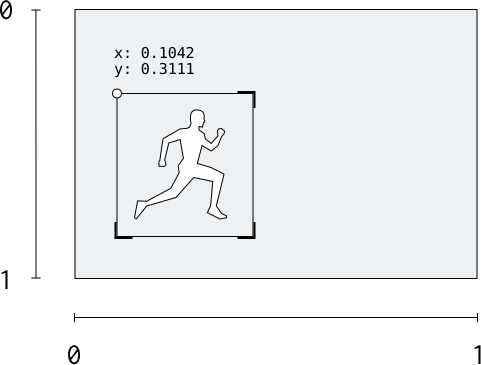
objects mapKey is detected objects and value is their coordinates
Coordinate representation
Actions
Open demoDetect actions in video: dancing, flying, driving, and more.
POST Recognize actions
Request example
curl -X POST \
        -H "Key: YOUR_KEY" \
        -F "file=@input.mp4" \
        https://api.skiv.com/actions
import requests
headers = {
'Key': 'YOUR_KEY',
}
files = {
'file': open('input.mp4', 'rb'),
}
response = requests.post('https://api.skiv.com/actions', headers=headers, files=files)const axios = require('axios');
const FormData = require('form-data');
const fs = require('fs');
const form = new FormData();
form.append('file', fs.readFileSync('input.mp4'), 'input.mp4');
const response = await axios.post(
'https://api.skiv.com/actions',
form,
{
headers: {
...form.getHeaders(),
'Key': 'YOUR_KEY'
}
}
);* Follows the API Flow steps
file file *File to process
* required
Info
Supported video formatsAVI, MP4, MKV, MOV, WEBM
Max file size5GB
Max duration1 hour
Response example
{
  "status": done,
  "actions": {
    "driving": [{"s": 5.62, "e": 6.28, "q": 0.5}, {"s": 14.83, "e": 15.46, "q": 0.5}],
    "running": [{"s": 82.29, "e": 82.93, "q": 0.5}],
    "riding": [{"s": 107.8, "e": 108.44, "q": 0.5}]
  }
}status stringIndicates the status of the job ("done", "pending", or "error")
actions mapKey is detected action and value is a list with its occurrences
Text
Open demoOCR: locate and read text in an image.
POST Identify text in an image
Request example
curl -X POST \
        -H "Key: YOUR_KEY" \
        -F "file=@input.png" \
        https://api.skiv.com/text
import requests
headers = {
'Key': 'YOUR_KEY',
}
files = {
'file': open('input.png', 'rb'),
}
response = requests.post('https://api.skiv.com/text', headers=headers, files=files)const axios = require('axios');
const FormData = require('form-data');
const fs = require('fs');
const form = new FormData();
form.append('file', fs.readFileSync('input.png'), 'input.png');
const response = await axios.post(
'https://api.skiv.com/text',
form,
{
headers: {
...form.getHeaders(),
'Key': 'YOUR_KEY'
}
}
);* Follows the API Flow steps
file file *File to process
* required
Info
Supported formatsJPEG, PNG, BMP, WEBP
Max file size50MB
Response example
{
  "status": "done",
  "text": {
    "hello": [{"x": 0.108, "y": 0.281, "w": 0.314, "h": 0.233, "q": 0.5}],
    "world": [{"x": 0.452, "y": 0.280, "w": 0.295, "h": 0.221, "q": 0.5}]
  }
}status stringIndicates the status of the job ("done", "pending", or "error")
text mapKey is a string with the text and the value is the bounding box
Coordinate representation
Scenes
Open demoSplit a video at shot boundaries. Returns scene timestamps.
POST Detect and cluster scenes
Request example
curl -X POST \
        -H "Key: YOUR_KEY" \
        -F "file=@input.mp4" \
        https://api.skiv.com/scenes
import requests
headers = {
'Key': 'YOUR_KEY',
}
files = {
'file': open('input.mp4', 'rb'),
}
response = requests.post('https://api.skiv.com/scenes', headers=headers, files=files)const axios = require('axios');
const FormData = require('form-data');
const fs = require('fs');
const form = new FormData();
form.append('file', fs.readFileSync('input.mp4'), 'input.mp4');
const response = await axios.post(
'https://api.skiv.com/scenes',
form,
{
headers: {
...form.getHeaders(),
'Key': 'YOUR_KEY'
}
}
);* Follows the API Flow steps
file file *File to process
* required
Info
AVI, MP4, MKV, MOV, WEBM
5GB
5 hours
Response example
{
  "status": "done",
  "scenes": [[[0.0, 8.25]], [[8.28, 16.41], [16.45, 18.92]],
             [[18.77, 25.22]], [[25.26, 45.30]]]
}status stringIndicates the status of the job ("done", "pending", or "error")
scenes arrayList of scene clusters containing one or more scenes, represented by [start, end] times in seconds
Colors
Open demoExtract dominant colors from an image.
POST Identify colors
Request example
curl -X POST \
     -H "Key: YOUR_KEY" \
     -F "file=@input.png" \
     https://api.skiv.com/colors
import requests
headers = {
'Key': 'YOUR_KEY',
}
files = {
'file': open('input.png', 'rb'),
}
response = requests.post('https://api.skiv.com/colors', headers=headers, files=files)const axios = require('axios');
const FormData = require('form-data');
const fs = require('fs');
const form = new FormData();
form.append('file', fs.readFileSync('input.png'), 'input.png');
const response = await axios.post(
'https://api.skiv.com/colors',
form,
{
headers: {
...form.getHeaders(),
'Key': 'YOUR_KEY'
}
}
);* Follows the API Flow steps
file file *File to process
* required
Info
JPEG, PNG, BMP, WEBP
50MB
Response example
{
  "status": "done",
  "colors": {"black": 0.252, "blue": 0.035, "brown": 0.08, "green": 0.01, "grey": 0.591, "orange": 0.01, "pink": 0.01, "purple": 0.0, "red": 0.0, "white": 0.01, "yellow": 0.0}
}status stringIndicates the status of the job ("done", "pending", or "error")
colors mapKey is a string with the color and the value is the proportion of that color in the image
Sense
Open demoScore the sentiment of a text from negative to positive.
POST Sentiment analysis
Request example
curl -X POST \
        -H "Key: YOUR_KEY" \
        -d "this is cool and awesome and not bad" \
        https://api.skiv.com/sense
import requests
headers = {
'Key': 'YOUR_KEY',
'Content-Type': 'application/x-www-form-urlencoded',
}
data = 'this is cool and awesome and not bad'
response = requests.post('https://api.skiv.com/sense', headers=headers, data=data)const axios = require('axios');
const response = await axios.post(
'https://api.skiv.com/sense',
'this is cool and awesome and not bad',
{
headers: {
'Key': 'YOUR_KEY',
'Content-Type': 'application/x-www-form-urlencoded'
}
}
);text string *Text to analyze
* required
Info
5MB
Response example
{
  "positive": 8,
  "negative": 0,
  "total": 8
}positive intPositivity estimate for the text.
negative intNegativity estimate for the text.
total intWord count in the text.